Role of Software Engineers in AI-Assisted Projects
AI code generators can produce a working function in seconds, but someone still has to decide whether that function belongs in the codebase at all. The engineer's job has not disappeared with the arrival of Copilot, Cursor, and Claude. It has shifted from typing every line to orchestrating what gets built, how it gets reviewed, and why it ships. This article breaks down exactly where software engineers fit in AI-assisted projects and how to make that role concrete on your team.

AI code generators can produce a working function in seconds, but someone still has to decide whether that function belongs in the codebase at all. The engineer's job has not disappeared with the arrival of Copilot, Cursor, and Claude. It has shifted from typing every line to orchestrating what gets built, how it gets reviewed, and why it ships. This article breaks down exactly where software engineers fit in AI-assisted projects and how to make that role concrete on your team.
Photo by cottonbro studio from Pexels
TL;DR:- Software engineers remain the decision-makers in AI-assisted projects: they define architecture, enforce quality gates, and own production reliability.
- AI tools accelerate output but introduce new review burdens, consistency risks, and skill-atrophy traps that engineers must actively manage.
- The winning workflow treats AI as a junior pair programmer whose every commit gets scrutinized before merge.
What Are AI-Assisted Projects?
An AI-assisted project is any software effort where generative AI tools participate in writing, reviewing, or refactoring code. That includes inline completions from GitHub Copilot, multi-file edits from Cursor's agent mode, test generation from Codium, and architecture suggestions from ChatGPT or Claude.
The key distinction: AI assists, it does not own. The repository, the CI pipeline, the deployment target, and the on-call rotation still belong to humans. AI-assisted does not mean AI-driven. A project where nobody reviews the generated output is not "AI-assisted." It is unreviewed code with extra steps.
Stack Overflow's 2024 Developer Survey showed the vast majority of professional developers already use AI coding tools in some capacity. That number keeps climbing. The question is no longer whether your team uses AI. It is whether your team uses AI well.
How Engineers Integrate AI Into Workflows

Dropping an AI tool into an existing workflow without structure creates chaos. Engineers who integrate AI effectively follow a deliberate pattern:
- Scope the task first. Before prompting, define what the function, module, or feature should do. Write the interface or type signature yourself. Let AI fill the implementation.
- Use project-level context. Tools like Cursor and Cody let you feed repository context. Point them at your style guide, existing abstractions, and test patterns. Without context, AI generates generic code that clashes with your conventions.
- Treat AI output as a draft. Every generated block goes through the same review process as human-written code. No exceptions.
- Automate the guardrails. Linters, formatters, type checkers, and test suites catch the mistakes AI introduces silently. Run them on every save, not just on push.
- Log what AI produced. Some teams tag AI-generated commits or use
.ai-generatedmarkers. This helps during post-incident reviews when you need to trace a bug to its origin.
/prompts directory. When the whole team uses the same prompt templates for common tasks (API endpoints, database migrations, test scaffolds), AI output stays consistent across contributors.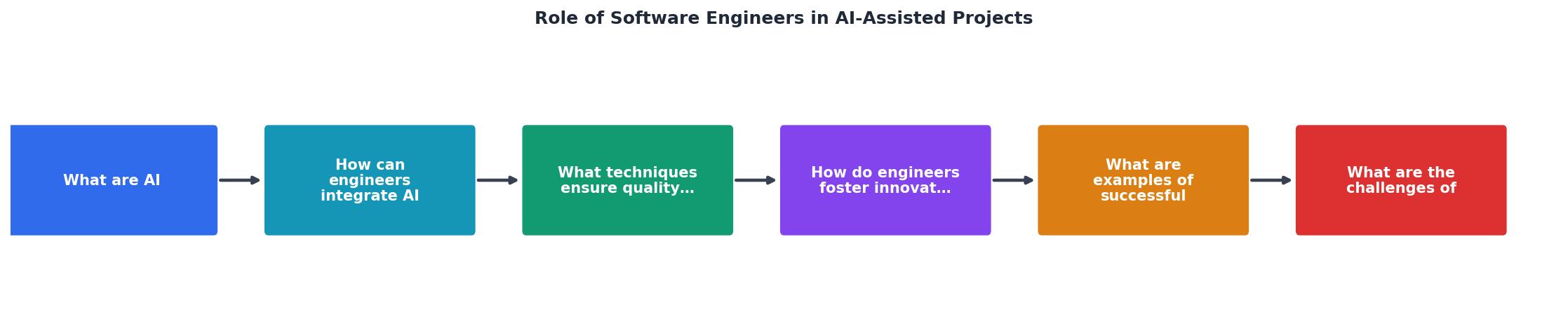
The diagram above shows the core loop: Scope, Prompt, Generate, Review, Refine, Merge. Engineers own every step except Generate. That is the entire point.
In practice, teams report spending more time reviewing AI output than they previously spent writing code from scratch. That is not a failure. Review is where the engineering value lives.
Quality Gates for AI-Generated Code
AI-generated code passes syntax checks easily. It compiles. It often runs. But "it runs" is a low bar. Here is what experienced engineers look for during AI code review:
- Correctness beyond the happy path. AI tends to generate code that handles the obvious case. Edge cases, null inputs, concurrent access, and error propagation get skipped. Check every branch.
- Dependency hygiene. AI loves importing libraries. Verify that every new dependency is intentional, licensed correctly, and not abandoned. A single
npm installsuggestion from AI can add 40 transitive packages. - Security patterns. SQL injection, XSS, insecure deserialization, and hardcoded secrets appear in AI output regularly. Static analysis tools like Semgrep, Snyk, and CodeQL catch many of these, but manual review still matters for business logic flaws.
- Performance characteristics. AI-generated database queries often work but scan entire tables. AI-generated loops sometimes have O(n^2) complexity hidden behind clean-looking code. Profile before shipping.
- Consistency with existing patterns. If your codebase uses the repository pattern for data access, AI might generate inline SQL in a controller. Consistency is the reviewer's job.
"Any time I have to type precise syntax by hand now [instead of using AI] feels like such a tedious chore.">, When AI writes almost all code, what happens to software engineering?
That quote captures the shift perfectly. Writing syntax is becoming the easy part. The hard part is knowing what to write and verifying that what got written is correct.
Fostering Innovation With AI

AI does not just speed up existing work. It opens doors that were previously too expensive to walk through.
Rapid prototyping becomes trivial. An engineer can generate three different implementations of a feature in an afternoon, benchmark them, and pick the winner. Before AI, that kind of exploration was a luxury reserved for hackathons.
Cross-stack experimentation gets easier. A backend engineer curious about a React frontend can use AI to scaffold a working UI, learn from the generated code, and iterate. The barrier between "I know this stack" and "I can build in this stack" drops significantly.
Documentation and test generation go from afterthoughts to defaults. Engineers who previously skipped writing tests because of time pressure now generate test suites in minutes. The tests still need review, but the activation energy drops to near zero.
Concrete example: a team at a mid-size SaaS company used Cursor's agent mode to generate integration tests for 200 API endpoints in two days. A human engineer reviewed and fixed each test. The total effort was roughly one week. Without AI, the estimate was six weeks. That is not a marginal improvement. That is a category change.
Challenges of AI Adoption
Not everything goes smoothly. Here are the obstacles that trip up real teams:
- Skill atrophy. Engineers who rely on AI for everything stop building mental models of the code. When the AI is wrong (and it will be), they lack the depth to diagnose the problem. Deliberate practice without AI remains important.
- Review fatigue. AI generates code fast. Reviewing it takes the same effort as reviewing human code, sometimes more because AI output lacks the implicit context a colleague would provide. Teams need to budget review time explicitly.
- Inconsistent adoption. One engineer uses Copilot for everything. Another refuses to touch it. A third uses ChatGPT but pastes code without attribution. Without team-level norms, the codebase becomes a patchwork.
- Security and IP concerns. Code sent to cloud-based AI services may be logged, trained on, or exposed. Self-hosted models (Code Llama, StarCoder) and enterprise agreements (GitHub Copilot for Business, Amazon CodeWhisperer) address this, but the default is not private.
- Over-trust in AI output. The code looks clean. The variable names are good. The comments are helpful. So it must be correct, right? Wrong. Clean-looking code with subtle bugs is harder to catch than obviously messy code.
| Without AI Norms | With AI Norms |
|---|---|
| Inconsistent code style | Shared prompt templates |
| Unreviewed AI output | Mandatory review for all generated code |
| Unknown dependencies added | Dependency allow-list enforced |
| No traceability | AI-generated commits tagged |
| Security gaps | Static analysis on every PR |
Real-World Integration Examples
Shopify publicly discussed using AI coding tools across their engineering organization. Their approach: AI generates, humans review, CI enforces. They reported measurable productivity gains while maintaining their existing quality bar.
Stripe engineers use AI for boilerplate generation and test scaffolding but keep critical payment logic hand-written and hand-reviewed. The boundary between "AI-appropriate" and "human-only" code is explicit in their workflow.
Small startups with 2-3 engineers use AI to punch above their weight. A solo developer building a SaaS product can generate CRUD endpoints, admin dashboards, and email templates with AI, then focus their limited review time on authentication, billing, and data integrity.
The pattern across all these examples: AI handles volume, engineers handle judgment.
Here is an example dashboard showing how a typical engineering team's time allocation shifts when AI tools are integrated into the development workflow:
Engineer Time Allocation (AI-Assisted Team)
AI Tool Integration Checklist for Engineering Teams
Your progress is saved automatically in your browser.
FAQ
Frequently Asked Questions
Additional Resources
- When AI writes almost all code, what happens to software ... - But with AI writing most of the code, the advantage of knowing several languages will become less important when any engineer can jump into any ...
- AI in Software Development: Tools, Risks, & Careers - As AI takes on more routine programming tasks, the developer role shifts toward guiding decisions, evaluating outcomes, and staying accountable ...
- AI-Assisted Software Engineering at Scale - AI produces better results when it knows your coding style, architecture rules, and preferred patterns. Without that guidance, you get ...
Ready to Master Vibe Coding?
Learn to build software faster with AI assistance using the Vibe Coding Bible.
Get Started