Optimizing AI-Generated Code for Mobile Platforms
AI tools like Cursor, Claude, and Copilot can scaffold a working mobile app in hours. But the code they produce almost always ignores the constraints that make mobile different from desktop: limited memory, battery budgets, spotty networks, and screens where every millisecond of jank drives users away. Getting from a working prototype to a production-grade mobile app means knowing exactly where AI-generated code falls short and how to fix it before your users notice.

AI tools like Cursor, Claude, and Copilot can scaffold a working mobile app in hours. But the code they produce almost always ignores the constraints that make mobile different from desktop: limited memory, battery budgets, spotty networks, and screens where every millisecond of jank drives users away. Getting from a working prototype to a production-grade mobile app means knowing exactly where AI-generated code falls short and how to fix it before your users notice.
- AI-generated mobile code typically ships with redundant re-renders, unoptimized images, and no battery-awareness. Fixing these three areas alone can cut load times by 40% or more.
- Focus optimization on startup performance, background task management, and touch-response latency.
- Use platform profilers (Xcode Instruments, Android Studio Profiler) to catch what AI missed before your users do.
Why mobile optimization matters
Desktop apps run on machines plugged into walls with gigabytes of free RAM. Mobile apps run on devices that throttle CPUs when they get warm, kill background processes to save battery, and connect through networks that drop packets between elevator floors. AI code generators treat all environments the same. They produce clean, functional code that completely ignores these realities.
That number is not abstract. It means more than half your potential users leave before they see your first screen if your AI-generated app loads slowly. The gap between "it works on my laptop" and "it works on a three-year-old Android phone on 4G" is where optimization lives.
A React Native app scaffolded by an AI assistant will often import entire libraries when it needs one function, create new object instances on every render cycle, and fetch full-resolution images regardless of screen size. None of this breaks anything during development. All of it breaks the experience in production.
Improve startup and load times

Startup time is the single metric that determines whether someone keeps your app or uninstalls it within 30 seconds. Here is where AI-generated code typically needs the most work:
- Tree-shake unused imports. AI assistants import broadly. Run
npx depcheck(React Native) or review your Gradle dependency tree (Android) to find libraries loaded but never called. - Lazy-load screens. AI often generates eager navigation stacks. Switch to
React.lazy()or Android'sNavigationcomponent with lazy fragment loading so only the visible screen loads at launch. - Compress and resize images. AI code frequently uses raw asset paths with no size constraints. Convert to WebP, serve multiple resolutions with
srcSetor Android's drawable qualifiers, and set explicit width/height to prevent layout shifts. - Defer non-critical network calls. AI-generated
useEffecthooks oronCreatemethods tend to fire every API call at once. Prioritize the data the user sees first; load the rest after the initial render.
Reduce battery consumption
AI-generated code has no concept of energy budgets. It will poll an API every five seconds, keep GPS active in the background, and run animations on screens the user is not looking at. Each of these drains battery and triggers the operating system's power-management penalties, which throttle your app further.
Key strategies:
- Replace polling with push notifications or WebSockets. If your AI built a
setIntervalthat checks for new data, replace it with Firebase Cloud Messaging (Android/iOS) or a WebSocket connection that only wakes the app when data arrives. - Use batched location updates. Instead of continuous GPS tracking, use
CLLocationManager's significant-change service on iOS or Android'sFusedLocationProviderClientwith a reasonable interval (30+ seconds for most use cases). - Stop animations when off-screen. AI-generated Lottie or CSS animations keep running in background tabs. Hook into
AppState(React Native),onPause/onResume(Android), orscenePhase(SwiftUI) to pause them. - Profile wake locks. AI code sometimes acquires wake locks for network operations and never releases them. Android's Battery Historian and Xcode's Energy Log catch these immediately.
"The need for refactoring becomes apparent, especially when integrating new features, contributing to an overall increase in time investment.">, Optimizing Mobile App Development Workflows with Generative AI
That refactoring cost is real, but catching battery issues early keeps it manageable. Waiting until users complain about drain means rewriting entire data layers under pressure.
Improve the user experience

Performance and UX are not separate concerns on mobile. A list that stutters during scroll is a UX problem. A button that takes 300ms to respond feels broken even if it works correctly.
Touch responsiveness: AI-generated tap handlers often trigger synchronous work (state updates, navigation, API calls) on the main thread. Move heavy computation to a background thread or use requestAnimationFrame to keep the UI thread free. On native Android, use Dispatchers.Default with Kotlin coroutines; on iOS, dispatch to a background queue.
Scroll performance: AI loves to render flat lists with map(). On mobile, this means creating DOM nodes or views for thousands of items at once. Switch to FlatList (React Native), RecyclerView (Android), or LazyVStack (SwiftUI) so only visible items exist in memory.
Offline states: AI-generated code almost never handles network loss gracefully. Add a connectivity listener and show cached data or a clear offline indicator instead of a blank screen or a cryptic error.
The optimization process
The diagram below shows the workflow that turns raw AI output into production-ready mobile code. Each step is a checkpoint, not a one-time task. Run through this loop every time you add a significant feature.
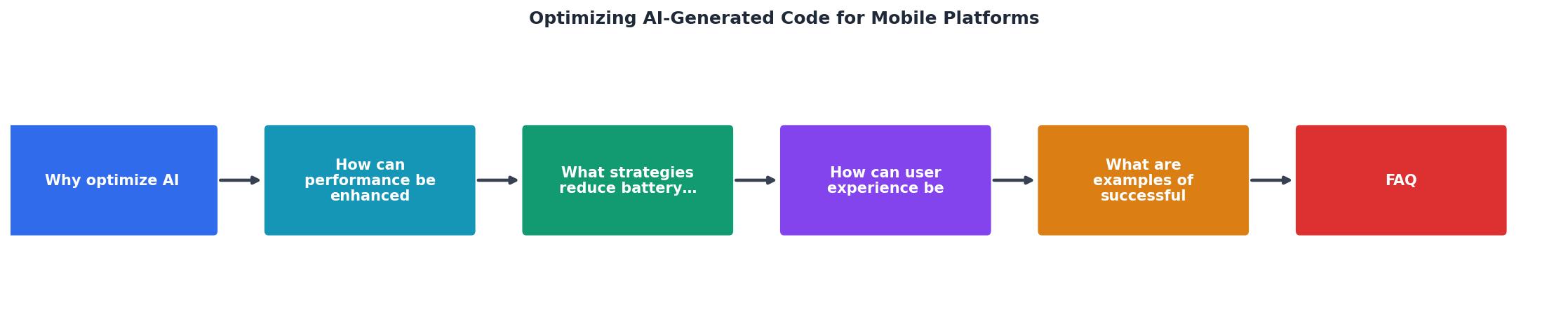
The steps: Profile the current state on a real device. Identify the top three bottlenecks (startup, memory, battery). Refactor the AI-generated code targeting those bottlenecks. Test on low-end hardware. Measure again to confirm improvement. Repeat.
The following interactive card summarizes the typical performance gains you can expect at each stage of this optimization loop when applied to a standard AI-scaffolded mobile app:
Optimization Impact by Area
Real-world optimization examples
Duolingo uses AI to generate lesson UI components, then runs automated performance budgets in CI. Any component that exceeds 16ms render time on a Pixel 4a gets flagged and rewritten. This approach catches AI-generated inefficiencies before they reach users.
Grab (Southeast Asia's super-app) found that AI-generated networking code created duplicate HTTP clients across modules. Consolidating to a single shared client with connection pooling cut their app's memory footprint and reduced battery-draining socket operations.
These examples share a pattern: AI generates the first draft, humans profile and refine, and automated checks prevent regressions.
Mobile Optimization Checklist for AI-Generated Code
Your progress is saved automatically in your browser.
FAQ
Frequently Asked Questions
What is the first optimization you run on AI-generated mobile code? Share your profiling workflow in the comments.
Additional Resources
- Optimizing Mobile App Development Workflows with ... - By creating detailed, high-quality prompts, Generative AI can be used to create customized code snippets and much more. Let's explore the perks ...
- FREE AI-Powered Code Optimization - Try Context-Driven ... - From automated refactoring to performance tuning, learn how our AI platform enhances coding for developers at all levels.
- AI code generation: Best practices for enterprise adoption ... - Discover 8 proven practices for enterprise AI code generation success. Learn how to implement GitHub Copilot, Cursor, and other AI coding ...
Ready to Master Vibe Coding?
Learn to build software faster with AI assistance using the Vibe Coding Bible.
Get Started